> ## Documentation Index
> Fetch the complete documentation index at: https://docs.zyntex.dev/llms.txt
> Use this file to discover all available pages before exploring further.
# Events
> Learn what events are and what they offer on Zyntex.
Events are a crucial Zyntex feature. They allow you to send a payload to either a Roblox server (or all servers) or to the Dashboard.
## Use cases
1. **Live Events:** If you need to activate a live event across all servers, Zyntex Events makes that super simple.
2. **Session Recap:** Send a session recap for each player, which includes information such as how many levels they progressed and how many chests they opened.
3. **Discord Webhook:** You can set up events to automatically send a Discord webhook when they are invoked.
4. **Advanced Live Graphs:** Draw beautiful graphs as soon as invocations come in to properly analyze your data. By default, each event fires a live notification to all admins focused on your game in the dashboard
## Creating an event
To create an event, navigate to the **Events** tab in the Zyntex dashboard after selecting a game.
On this tab, you can see all active and deleted events. To create a new event, click **+ New Event** at the end of the event list.
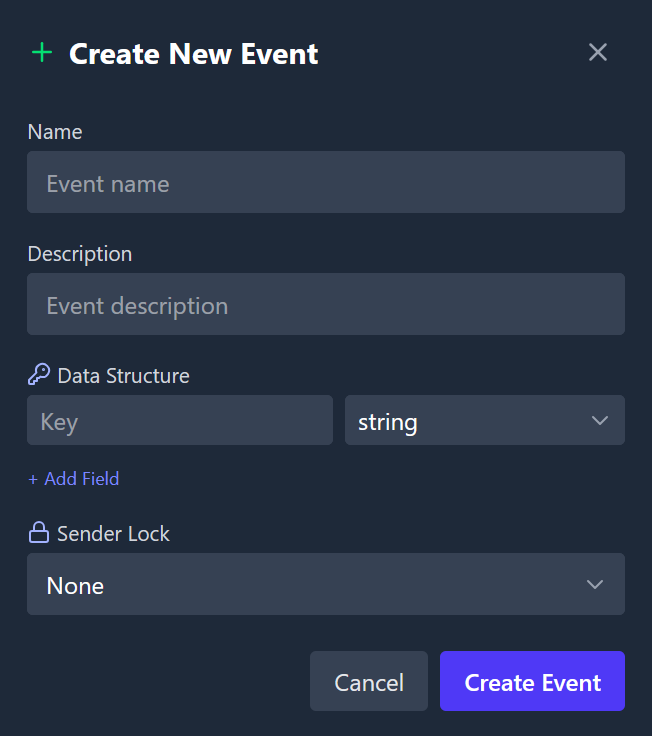
You will be prompted to enter the event's name, description, data structure, and whether it should be have a sender lock.
Event creation has limits. Here are the plan-specific limits:
* **Free Plan:** 1 event
* **Standard Plan:** 15 events
* **Business:** 50 events\
You will be notified by email if you reach your event limit.
 ### Sender lock
The sender lock is a "lock" on who can invoke the event. If set to `web`, only the dashboard can invoke the event. If set to `roblox`, only Roblox servers can invoke the event. If set to `none`, both the dashboard and Roblox server can invoke the event.
This allows you to structure your events in a way that makes sense for your game.
### Discord Webhooks
To set up a Discord webhook for an event, navigate to that event's page in the Zyntex dashboard and click on the **Discord Webhook** tab.
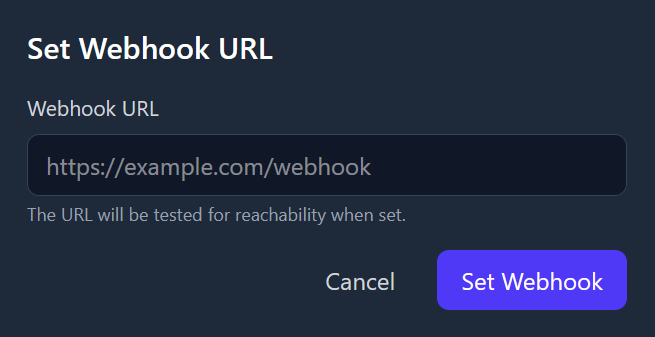
To the right, in the Details section, you can click **Click to edit** below Webhook URL to set up a webhook URL.
Currently, Zyntex supports Discord webhooks only, but we plan to add support for other webhook providers in the future.
### Sender lock
The sender lock is a "lock" on who can invoke the event. If set to `web`, only the dashboard can invoke the event. If set to `roblox`, only Roblox servers can invoke the event. If set to `none`, both the dashboard and Roblox server can invoke the event.
This allows you to structure your events in a way that makes sense for your game.
### Discord Webhooks
To set up a Discord webhook for an event, navigate to that event's page in the Zyntex dashboard and click on the **Discord Webhook** tab.
To the right, in the Details section, you can click **Click to edit** below Webhook URL to set up a webhook URL.
Currently, Zyntex supports Discord webhooks only, but we plan to add support for other webhook providers in the future.
 ## Invoking an event
To invoke an event from the Dashboard, navigate to the event's page and click the **Invoke** button under the page's header.
## Deleting an event
If you delete an event, it will no longer be available for invocation. However, you can still view the event's history and data in the dashboard.
## SDK Integration
### Getting an Event
To get an event in the Zyntex Roblox SDK, you can use the `Zyntex:GetEvent` method. This method takes the event's name as an argument and returns an event object.
```luau highlight={7} theme={null}
local Zyntex = require(path.to.zyntex)("YOUR-GAME-TOKEN")
Zyntex:init({
debug = false;
})
local Event = Zyntex:GetEvent("event_name") -- Alternatively, you can use Zyntex:GetEventById(1234)
```
### Listening to an Event
To listen to an `Event`, you can use the `Event:Connect` method. This method takes a callback function as an argument, which will be called whenever the event is invoked.
The callback function receives an `Invocation` object, which contains all of the invocation's data, such as the invocation ID, payload, and sender.
```luau theme={null}
Event:Connect(function(invocation)
print(`ID: {invocation.id}`)
print(`Event ID: {invocation.event_id}`)
print(`Data: {invocation.data}`)
print(`To: {invocation.to}`)
print(`Sender: {invocation.sender}`)
print(`From Server: {invocation.from_server}`)
print(`Invoked At: {invocation.invoked_at}`)
print(`To Server: {invocation.to_server}`)
print(`Game ID: {invocation.game_id}`)
print(`Invoked By: {invocation.invoked_by}`)
end)
```
The `Invocation` object is only a data structure and does not have any methods. It is used to access the data of the invocation.
### Invoking an Event
To invoke an event, you can use the `Event:Invoke` method. This method takes a table of key-value pairs as an argument, which will be sent as the event's payload.
```luau theme={null}
Event:Invoke(
{
{
["key"] = "Key",
["value"] = "Value"
},
{
["key"] = "AnotherKey",
["value"] = "AnotherValue"
}
}
)
```
If there is a sender lock mismatch or the invocation breaks the payload structure, an error will be thrown.
## Example: Server Shutdown Event
```luau theme={null}
local Zyntex = require(path.to.zyntex)("YOUR-GAME-TOKEN")
Zyntex:init({
debug = true;
})
local ServerShutdownEvent = Zyntex:GetEvent("Shutdown") -- assuming you have created an event called "Shutdown"
ServerShutdownEvent:Connect(function(invocation)
print("Server is shutting down!")
print("Reason: " .. invocation.data.Reason) -- assuming the payload has a Reason field
for _, player in game.Players:GetPlayers() do
player:Kick("Server is shutting down: " .. invocation.data.Reason)
end
end)
```
## Example: Chest Opening Event
```luau zyntex theme={null}
local Zyntex = require(path.to.zyntex)("YOUR-GAME-TOKEN")
Zyntex:init({
debug = true;
})
local ChestOpenedBinding = script:FindFirstChild("ChestOpenedBinding") :: BindableEvent -- A bindable event so that other scripts can invoke this event
ChestOpenedBinding.Event:Connect(function(player, chestId)
local ChestOpenedEvent = Zyntex:GetEvent("ChestOpened") -- assuming you have created an event called "ChestOpened"
ChestOpenedEvent:Invoke({
{
["key"] = "PlayerId",
["value"] = player.UserId
},
{
["key"] = "ChestId",
["value"] = chestId
}
})
end)
```
```luau ChestOpenHandler theme={null}
-- assuming the above script is named "zyntex" and is placed in ServerScriptService
local ChestOpenedBinding = game:GetService("ServerScriptService"):FindFirstChild("zyntex"):WaitForChild("ChestOpenedBinding") :: BindableEvent
local function onChestOpened(player, chestId)
ChestOpenedBinding:Fire(player, chestId)
-- Handle the chest opening logic here
end
```
## Invoking an event
To invoke an event from the Dashboard, navigate to the event's page and click the **Invoke** button under the page's header.
## Deleting an event
If you delete an event, it will no longer be available for invocation. However, you can still view the event's history and data in the dashboard.
## SDK Integration
### Getting an Event
To get an event in the Zyntex Roblox SDK, you can use the `Zyntex:GetEvent` method. This method takes the event's name as an argument and returns an event object.
```luau highlight={7} theme={null}
local Zyntex = require(path.to.zyntex)("YOUR-GAME-TOKEN")
Zyntex:init({
debug = false;
})
local Event = Zyntex:GetEvent("event_name") -- Alternatively, you can use Zyntex:GetEventById(1234)
```
### Listening to an Event
To listen to an `Event`, you can use the `Event:Connect` method. This method takes a callback function as an argument, which will be called whenever the event is invoked.
The callback function receives an `Invocation` object, which contains all of the invocation's data, such as the invocation ID, payload, and sender.
```luau theme={null}
Event:Connect(function(invocation)
print(`ID: {invocation.id}`)
print(`Event ID: {invocation.event_id}`)
print(`Data: {invocation.data}`)
print(`To: {invocation.to}`)
print(`Sender: {invocation.sender}`)
print(`From Server: {invocation.from_server}`)
print(`Invoked At: {invocation.invoked_at}`)
print(`To Server: {invocation.to_server}`)
print(`Game ID: {invocation.game_id}`)
print(`Invoked By: {invocation.invoked_by}`)
end)
```
The `Invocation` object is only a data structure and does not have any methods. It is used to access the data of the invocation.
### Invoking an Event
To invoke an event, you can use the `Event:Invoke` method. This method takes a table of key-value pairs as an argument, which will be sent as the event's payload.
```luau theme={null}
Event:Invoke(
{
{
["key"] = "Key",
["value"] = "Value"
},
{
["key"] = "AnotherKey",
["value"] = "AnotherValue"
}
}
)
```
If there is a sender lock mismatch or the invocation breaks the payload structure, an error will be thrown.
## Example: Server Shutdown Event
```luau theme={null}
local Zyntex = require(path.to.zyntex)("YOUR-GAME-TOKEN")
Zyntex:init({
debug = true;
})
local ServerShutdownEvent = Zyntex:GetEvent("Shutdown") -- assuming you have created an event called "Shutdown"
ServerShutdownEvent:Connect(function(invocation)
print("Server is shutting down!")
print("Reason: " .. invocation.data.Reason) -- assuming the payload has a Reason field
for _, player in game.Players:GetPlayers() do
player:Kick("Server is shutting down: " .. invocation.data.Reason)
end
end)
```
## Example: Chest Opening Event
```luau zyntex theme={null}
local Zyntex = require(path.to.zyntex)("YOUR-GAME-TOKEN")
Zyntex:init({
debug = true;
})
local ChestOpenedBinding = script:FindFirstChild("ChestOpenedBinding") :: BindableEvent -- A bindable event so that other scripts can invoke this event
ChestOpenedBinding.Event:Connect(function(player, chestId)
local ChestOpenedEvent = Zyntex:GetEvent("ChestOpened") -- assuming you have created an event called "ChestOpened"
ChestOpenedEvent:Invoke({
{
["key"] = "PlayerId",
["value"] = player.UserId
},
{
["key"] = "ChestId",
["value"] = chestId
}
})
end)
```
```luau ChestOpenHandler theme={null}
-- assuming the above script is named "zyntex" and is placed in ServerScriptService
local ChestOpenedBinding = game:GetService("ServerScriptService"):FindFirstChild("zyntex"):WaitForChild("ChestOpenedBinding") :: BindableEvent
local function onChestOpened(player, chestId)
ChestOpenedBinding:Fire(player, chestId)
-- Handle the chest opening logic here
end
```