> ## Documentation Index
> Fetch the complete documentation index at: https://docs.zyntex.dev/llms.txt
> Use this file to discover all available pages before exploring further.
# Experiments Quickstart
> Quickly set up experiments in your game.
## Creating an experiment
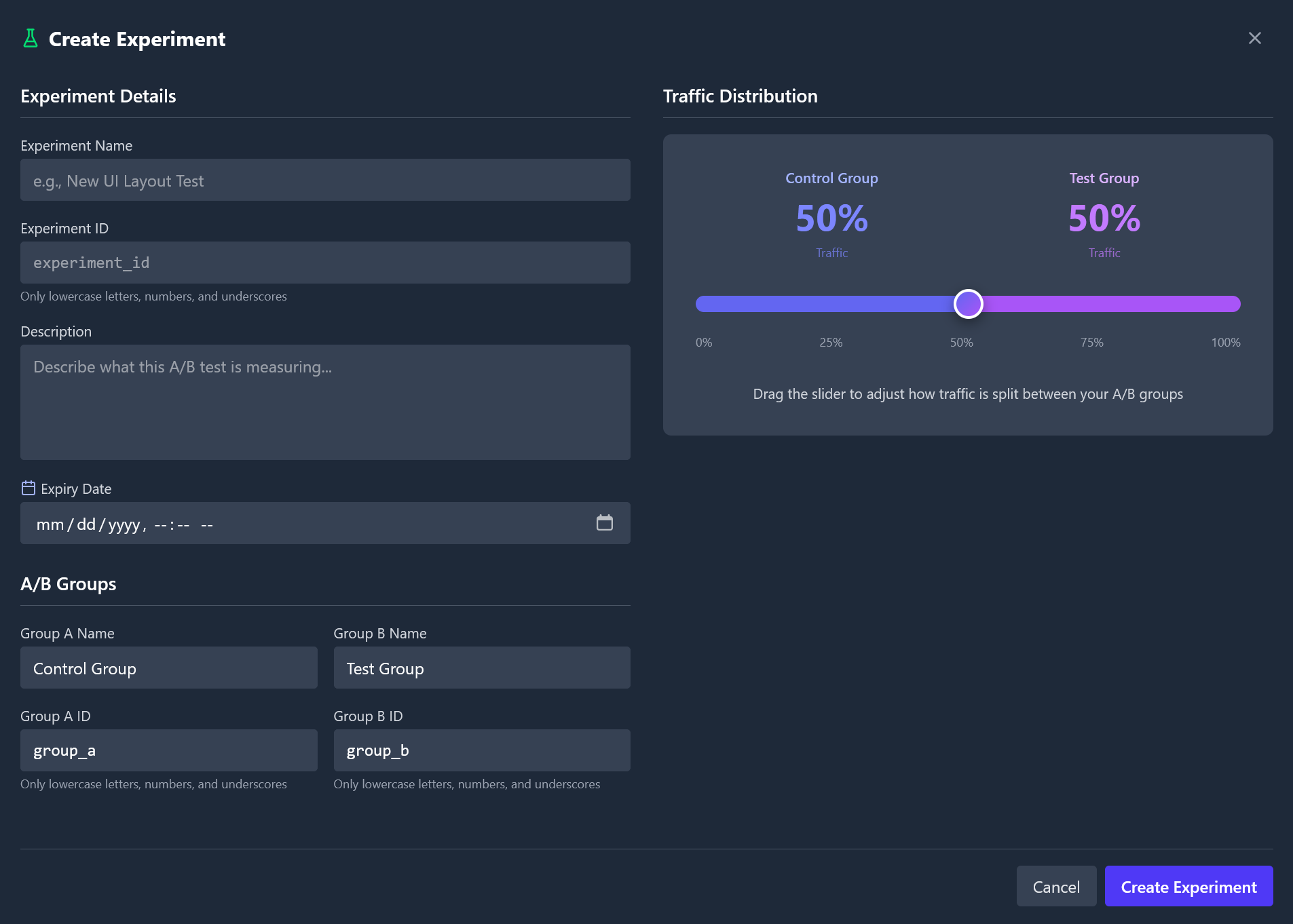
1. Navigate to the **Experiments** tab in the Zyntex dashboard after selecting a game.
2. Click **+ New Experiment** at the end of the experiment list.
3. Define the experiment details, such as the name, description, and expiration date.
4. Define the groups, such as the name, ID, and distribution percentage.
5. Click **Create**.
 ## SDK Integration
### Getting an Experiment
To get an experiment in the Zyntex Roblox SDK, you can use the `Zyntex:GetExperiment` method. This method takes the experiment's ID as an argument and returns an experiment object.
```luau highlight={7} theme={null}
local Zyntex = require(path.to.zyntex)("YOUR-GAME-TOKEN")
Zyntex:init {
debug = false;
}
local Experiment = Zyntex:GetExperiment("experiment_id")
print(Experiment:GetStatus()) -- "active" | "paused" | "archived"
```
### Getting a player's group
To get a player's group for an experiment, you can use the `Experiment:GetGroup` method. This method takes either a `Player` object or a player ID as an argument and returns the player's group.
```luau theme={null}
local Group = Experiment:GetGroup(1234) -- fetches the group for player with ID 1234
print(Group.id) -- prints the group's ID
```
This method registers a player as entering the experiment.
If a player has already entered the experiment, this method will return the same group. A player can't change groups once they have entered the experiment, even if they join a different server.
## Plan Restrictions
Because of how experiments work, a player that is not already registered by Zyntex will be rejected. This can cause problems if your game has more players than your plan's maximum player limit, as those players will be rejected from the experiment.
### Registering a conversion
If a player completes the goal of an experiment, you can register a conversion by using the `Group:Convert` method. This method takes the conversion value as an argument and marks the entrance as converted.
```luau theme={null}
Group:Convert(10) -- marks the entrance as converted with a value of 10
```
## Conversion Value
The conversion value is used to calculate the total value brought in by the group. For example, if a player spends 100 robux in a new shop UI, the conversion value would be 100.
The conversion value is optional. If omitted, it will be set to 0.
## Example
Let's say we have an experiment `shop_experiment` with the following groups:
* `shop_old` (Control Group)
* `shop_new` (Test Group)
We are testing the performance of the new shop UI compared to the old one.
```luau server.luau theme={null}
local Players = game:GetService("Players")
local ExperimentEvent = game:GetService("ReplicatedStorage"):WaitForChild("Experiment")
local Zyntex = require(path.to.zyntex)("YOUR-GAME-TOKEN")
local Zyntex:init {
debug = false;
}
local value: {[Player] = {value: number, group: any}} = {}
local Experiment = Zyntex:GetExperiment("shop_experiment")
Players.PlayerAdded:Connect(function(player: Player)
if not Experiment:GetStatus() == "active" then
-- Experiment is either paused or archived - skip
return
end
local Group = Experiment:GetGroup(player)
value[player] = {value = 0, group = Group}
if Group.id == "shop_new" then
-- Player is in the new shop UI group
ExperimentEvent:FireClient(player, "new")
return
end
-- Player is in the old shop UI group
ExperimentEvent:FireClient(player, "old")
end)
ExperimentEvent.OnServerEvent:Connect(function(player: Player, value: number)
value[player].value += value
end)
Players.PlayerRemoved:Connect(function(player: Player)
value[player].group:Convert(value[player].value or 0)
table.remove(value, player)
end)
```
```luau client.luau theme={null}
local ExperimentEvent = game:GetService("ReplicatedStorage"):WaitForChild("Experiment")
local ShopUIs = game:GetService("ReplicatedStorage"):WaitForChild("ShopUIs")
local LocalPlayer = game.Players.LocalPlayer
ExperimentEvent.OnClientEvent:Connect(function(group: "new" | "old")
if group == "new" then
-- Player is in the new shop UI group, so display the new shop UI
ShopUIs.NewShopUI:Clone().Parent = LocalPlayer.PlayerGui
return
end
-- Player is in the old shop UI group
ShopUIs.OldShopUI:Clone().Parent = LocalPlayer.PlayerGui
end)
-- Either can be done through the client or the server's MarketplaceService
local OnPurchase = function(value: number)
-- Player made a purchase
ExperimentEvent:FireServer(value)
end
```
## Analyzing experiment results
After running an experiment, you can analyze the results in the Zyntex dashboard.
Here are the metrics that you can use to analyze the results:
* **P-Value:** The probability of the experiment results being due to chance. If it is below 0.05, the experiment is statistically significant and you are recommended to switch to the winning group.
* **Z-Score:** The z-score of the experiment. The higher the z-score, the more statistically significant the experiment is.
* **Absolute Lift:** The difference in the number of conversions between the two groups. The higher the absolute lift, the better the group is.
* **Relative Lift:** The difference in the conversion rate between the two groups. The higher the relative lift, the better the group is.
* **Standard Error:** The standard error of the experiment. The lower the standard error, the more precise the experiment is.
## SDK Integration
### Getting an Experiment
To get an experiment in the Zyntex Roblox SDK, you can use the `Zyntex:GetExperiment` method. This method takes the experiment's ID as an argument and returns an experiment object.
```luau highlight={7} theme={null}
local Zyntex = require(path.to.zyntex)("YOUR-GAME-TOKEN")
Zyntex:init {
debug = false;
}
local Experiment = Zyntex:GetExperiment("experiment_id")
print(Experiment:GetStatus()) -- "active" | "paused" | "archived"
```
### Getting a player's group
To get a player's group for an experiment, you can use the `Experiment:GetGroup` method. This method takes either a `Player` object or a player ID as an argument and returns the player's group.
```luau theme={null}
local Group = Experiment:GetGroup(1234) -- fetches the group for player with ID 1234
print(Group.id) -- prints the group's ID
```
This method registers a player as entering the experiment.
If a player has already entered the experiment, this method will return the same group. A player can't change groups once they have entered the experiment, even if they join a different server.
## Plan Restrictions
Because of how experiments work, a player that is not already registered by Zyntex will be rejected. This can cause problems if your game has more players than your plan's maximum player limit, as those players will be rejected from the experiment.
### Registering a conversion
If a player completes the goal of an experiment, you can register a conversion by using the `Group:Convert` method. This method takes the conversion value as an argument and marks the entrance as converted.
```luau theme={null}
Group:Convert(10) -- marks the entrance as converted with a value of 10
```
## Conversion Value
The conversion value is used to calculate the total value brought in by the group. For example, if a player spends 100 robux in a new shop UI, the conversion value would be 100.
The conversion value is optional. If omitted, it will be set to 0.
## Example
Let's say we have an experiment `shop_experiment` with the following groups:
* `shop_old` (Control Group)
* `shop_new` (Test Group)
We are testing the performance of the new shop UI compared to the old one.
```luau server.luau theme={null}
local Players = game:GetService("Players")
local ExperimentEvent = game:GetService("ReplicatedStorage"):WaitForChild("Experiment")
local Zyntex = require(path.to.zyntex)("YOUR-GAME-TOKEN")
local Zyntex:init {
debug = false;
}
local value: {[Player] = {value: number, group: any}} = {}
local Experiment = Zyntex:GetExperiment("shop_experiment")
Players.PlayerAdded:Connect(function(player: Player)
if not Experiment:GetStatus() == "active" then
-- Experiment is either paused or archived - skip
return
end
local Group = Experiment:GetGroup(player)
value[player] = {value = 0, group = Group}
if Group.id == "shop_new" then
-- Player is in the new shop UI group
ExperimentEvent:FireClient(player, "new")
return
end
-- Player is in the old shop UI group
ExperimentEvent:FireClient(player, "old")
end)
ExperimentEvent.OnServerEvent:Connect(function(player: Player, value: number)
value[player].value += value
end)
Players.PlayerRemoved:Connect(function(player: Player)
value[player].group:Convert(value[player].value or 0)
table.remove(value, player)
end)
```
```luau client.luau theme={null}
local ExperimentEvent = game:GetService("ReplicatedStorage"):WaitForChild("Experiment")
local ShopUIs = game:GetService("ReplicatedStorage"):WaitForChild("ShopUIs")
local LocalPlayer = game.Players.LocalPlayer
ExperimentEvent.OnClientEvent:Connect(function(group: "new" | "old")
if group == "new" then
-- Player is in the new shop UI group, so display the new shop UI
ShopUIs.NewShopUI:Clone().Parent = LocalPlayer.PlayerGui
return
end
-- Player is in the old shop UI group
ShopUIs.OldShopUI:Clone().Parent = LocalPlayer.PlayerGui
end)
-- Either can be done through the client or the server's MarketplaceService
local OnPurchase = function(value: number)
-- Player made a purchase
ExperimentEvent:FireServer(value)
end
```
## Analyzing experiment results
After running an experiment, you can analyze the results in the Zyntex dashboard.
Here are the metrics that you can use to analyze the results:
* **P-Value:** The probability of the experiment results being due to chance. If it is below 0.05, the experiment is statistically significant and you are recommended to switch to the winning group.
* **Z-Score:** The z-score of the experiment. The higher the z-score, the more statistically significant the experiment is.
* **Absolute Lift:** The difference in the number of conversions between the two groups. The higher the absolute lift, the better the group is.
* **Relative Lift:** The difference in the conversion rate between the two groups. The higher the relative lift, the better the group is.
* **Standard Error:** The standard error of the experiment. The lower the standard error, the more precise the experiment is.